 App Sales Dash
A native revenue dashboard for macOS
One dashboard for App Store, Google Play and Stripe revenue
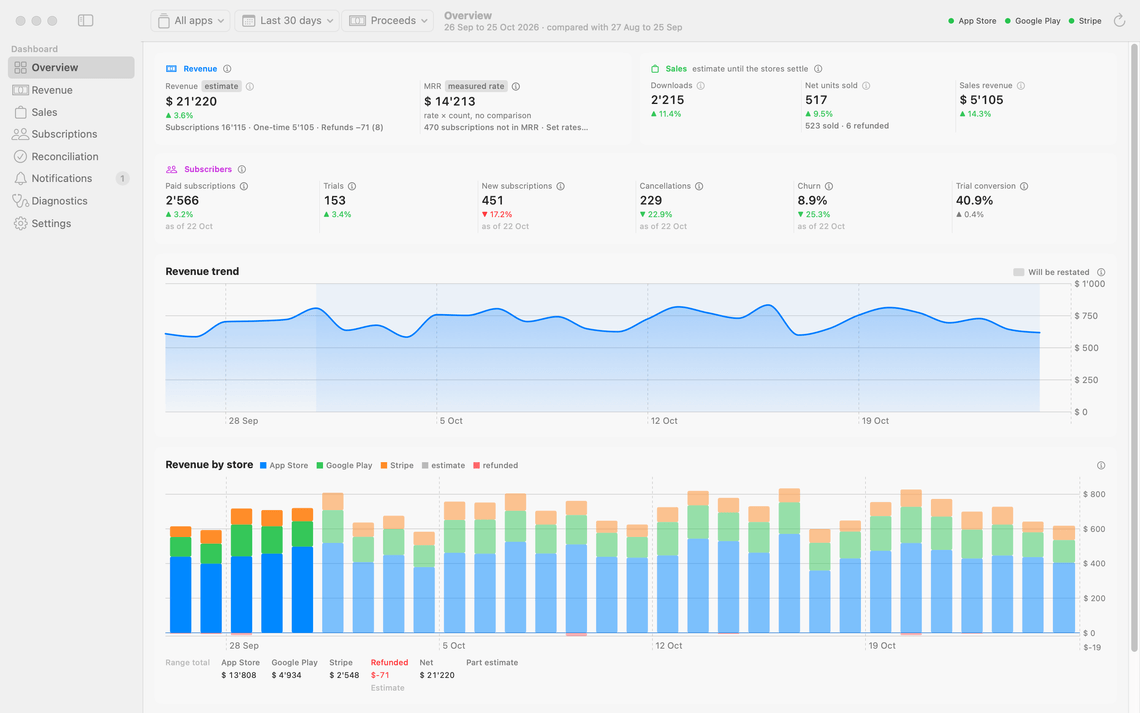
App Sales Dash reads your App Store, Google Play and Stripe reports straight from the stores and keeps everything on your Mac. Subscriptions, paid apps and one-time purchases count side by side, for one app or all of them. Daily figures start as estimates and switch to the stores' own finals, and the change is named in the notes, never applied quietly. Gaps are drawn as gaps, not zeroes. When a payout reaches the bank, you tick it off and export the statement your accountant needs.

Made for Macs running macOS 15 or later.
- Native macOS app
- Local data, no server
- No account, no analytics
- Read-only store connections
- Every figure labelled estimate or final
What it's for
Store dashboards disagree with each other, restate figures without a word, and none of them matches the bank statement on its own. App Sales Dash exists for the moment those numbers have to be accounted for. It consolidates all three sources into one local ledger with one set of definitions, for one app or all of them. Figures use your consolidation currency, by default the one your stores pay out in, converted at ECB daily reference rates.
You can always tell which figure you are looking at. A figure on screen always says what it is: the store's own final, an allocation of a final across days, an estimate that will be restated, or no figure at all, so a day the stores never reported shows up as missing, and you do not go hunting for a slump that never happened. A figure with nothing behind it reads No data, never 0. A quiet day inside a reported period reads 0, because that is what happened.
-
App Store
Apple's daily figures are estimates, and its settled total arrives weeks later, for a month that starts and ends mid-calendar. So an Apple number rarely matches the month you were asked about. App Sales Dash swaps in the final when it lands and shows the calendar month beside Apple's own, so August means August. The app also reads what your customers paid: first as an estimate, then as Apple's settled figure from the monthly report.
-
Google Play
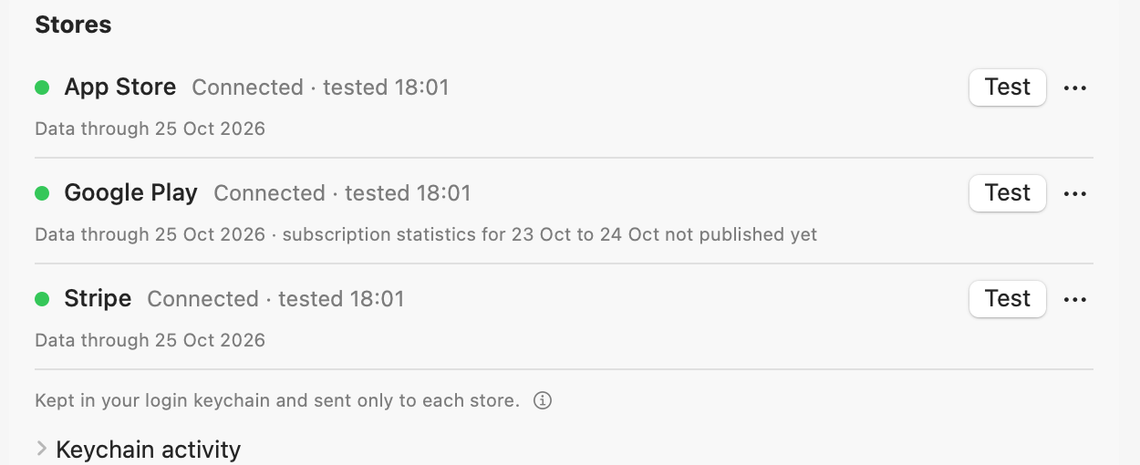
Play's most recent days keep moving: its figures are estimates, and subscriber counts arrive a few days behind. A dip at the end of the month can be nothing but reporting that has not caught up. App Sales Dash marks those days provisional, so you can tell a quiet week from a late one. It also fetches the reports for you.
-
Stripe
Stripe settles immediately, so its figures never change, but they sit apart from your store numbers, counted a different way. App Sales Dash puts them beside the other two under one set of definitions, and its payouts are the quickest to match against a line on your bank statement.
You connect each store once in Settings, and from then on the figures arrive on their own.
Feature overview
- One timeframe, every screen: set the period once and every screen answers for the same days.
- Estimate or final: every figure says how settled it is.
- Revenue you can take apart: by store, by plan, by country, by app, and subscriptions set against one-time sales.
- Sales and downloads: first installs from the App Store, paid apps and one-time purchases from every store, by version and by country.
- One app or all of them: pick an app once and every screen, and every statement, follows.
- Refunds in plain sight: every total shows what it includes; every refund is listed on the statement.
- Subscriptions in motion: active, trials, churn, and where MRR moved.
- MRR from what you were paid: measured, not read off a price list.
- Plan names you recognise: not store identifiers.
- Restatements named: when finals replace estimates, the notes say which period changed and when.
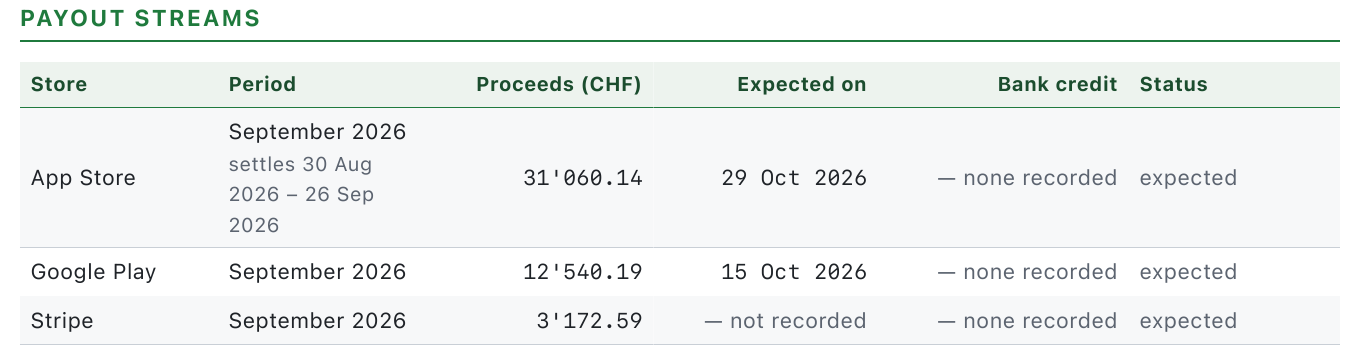
- A payout ledger: what each store owed against what the bank credited, with the expected payouts filled in for you.
- Statements for accounting: PDF and CSV, per store and consolidated.
- History kept: every report archived, past the year Apple keeps its own.
- A backup that is one file: database and archive in a single zip.
More than one app? Pick one, or see them all
A picker beside the timeframe offers all your apps, one app, or what is not assigned yet, and every screen follows it, from the Overview to the statement export. The same app on the App Store and Google Play counts as one app. Name, merge or split your apps in Settings, and tell the app which Stripe prices belong to which product. From then on, which app carried the quarter is a one-click answer.
The Revenue screen
Revenue by store, plan and country
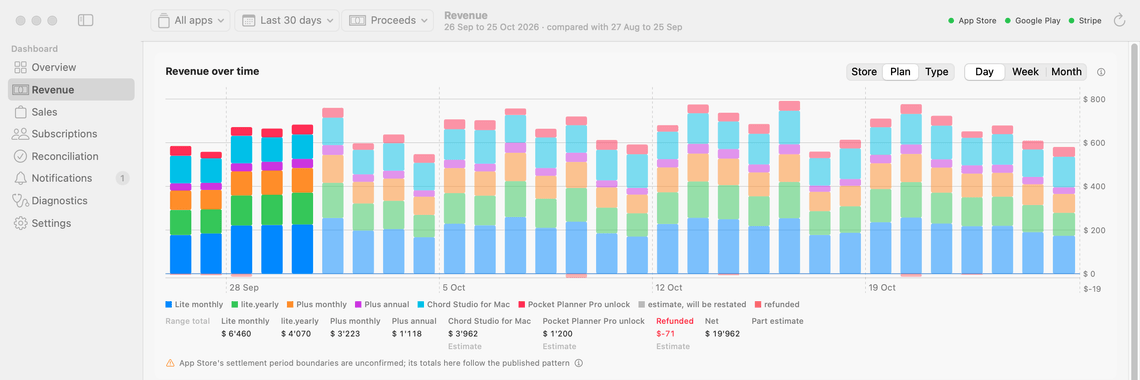
Revenue over any span you choose, split by store or by product, with a per-country table beside it. When someone asks which app carried the quarter, you pick that app and every screen answers, even when it sells on two stores.
Fees, tax and refunds per store, where the store reports them, and subscriptions set apart from one-time sales. Downloads and sales have a screen of their own, so a country with two hundred downloads and two purchases reads as exactly that. Every figure says whether it is settled or still moving.
Refunds in plain sight
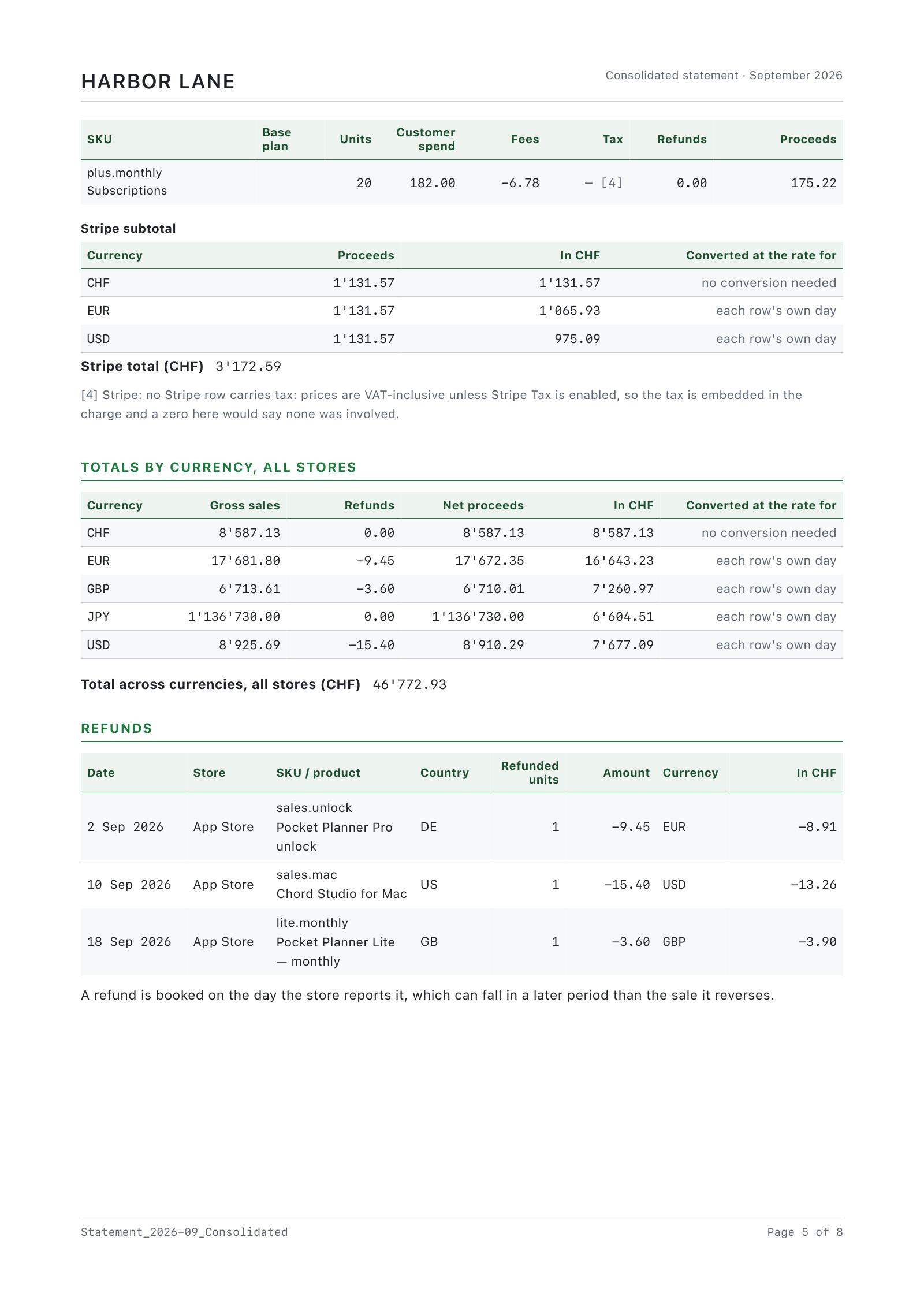
Your totals do not change, but you can see what is inside them. The Overview shows revenue including refunds and how many units came back. The Revenue screen lists refunds per store and draws them below zero in red. The statement lists every refund and prints gross, refunds and net, so nobody has to ask why a month came in lower than the sales suggested.
The Subscriptions screen
Subscribers, trials and where MRR moved
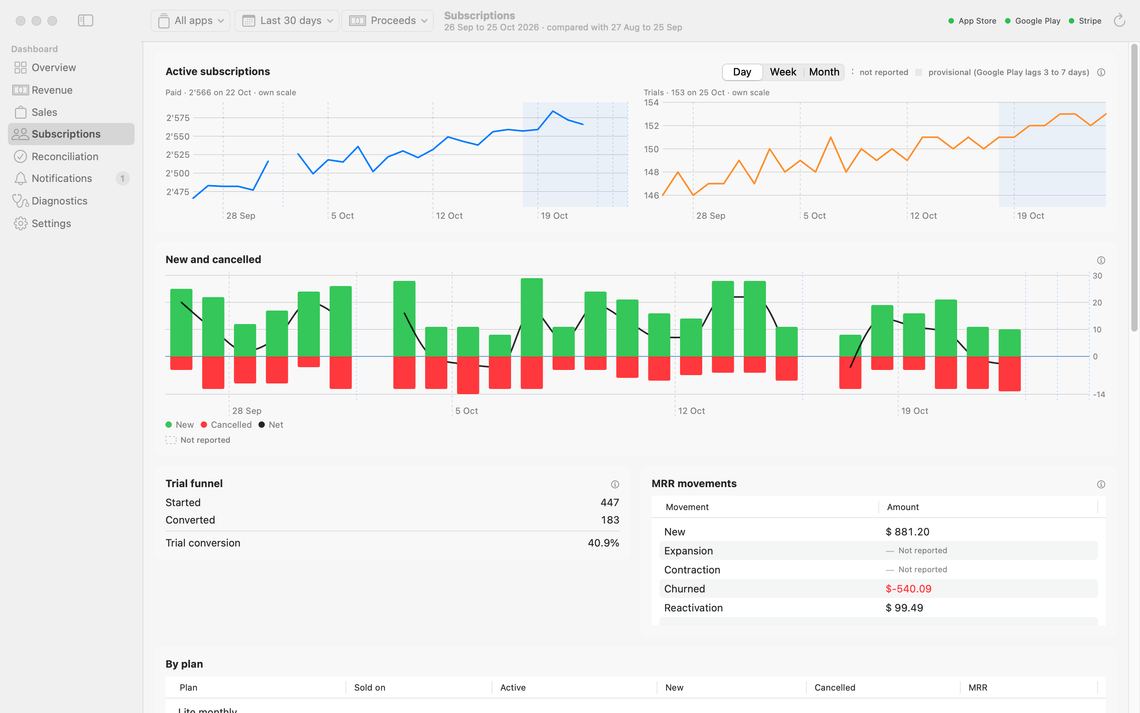
Active subscribers and trials over time, new and cancelled set against each other with the net between them, and a trial funnel from started to converted. A month that added forty and lost thirty-eight reads as the flat month it was.
MRR movements split the change into new, upgrades, downgrades, cancellations and returning customers. The per-plan table uses the names you use with customers, so you can quote a plan without translating an identifier first.
When something changes
Nothing changes quietly
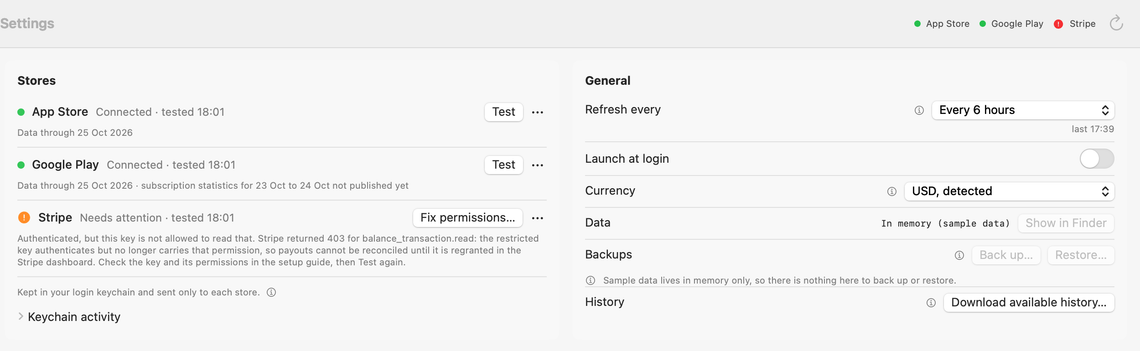
A store that refuses a key or keeps failing turns its dot red in the toolbar, and its row in Settings says what went wrong and what to do about it.
When the stores’ finals replace the estimates, the chart’s notes name the period and the day the finals landed. When an app update reads your stored reports more accurately, Notifications says what moved.
The Reconciliation screen
Match store payouts to your bank statement
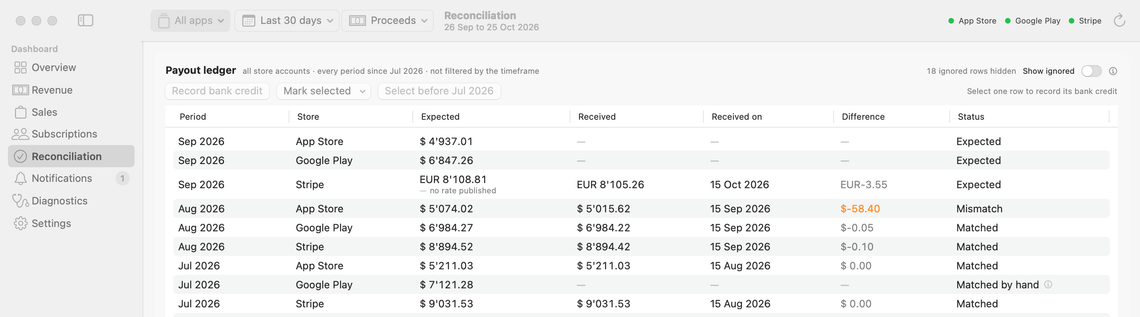
A payout lands in the bank and the old routine starts: find the store's report, rebuild the expected figure, work out whether the gap is a fee, an exchange rate or a mistake. Here the expected amount is already there, and Stripe's payouts arrive already matched. For the App Store and Google Play you type what the bank actually credited, and within a minute you know whether the payment is right.
When a payment is short, the shortfall stays on the record instead of being absorbed into a total. And you start from your first full month with the app, so there is no year of old bank statements to match up first.
Estimates and finals
Every figure is labelled estimate or final
Every monetary answer in App Sales Dash carries a basis, drawn so the difference is visible at a glance:
- Final: the store's own settled figure for those days. It will not change.
- Allocated: a settled total spread across its days. Exact for the period as a whole, an inference for the individual day. Apple settles over spans that start and end mid-month, which makes this the normal case for a calendar view.
- Estimate: no finals have landed yet. Drawn in a lighter shade, because it will be restated when the store settles the period.
- Part estimate: the span covers settled and unsettled periods both.
- No figure: nothing was reported. It is marked as missing rather than drawn as a zero, so you can tell a day with no sales from a day the store has not sent yet.
Three more places where you would otherwise be guessing: rows whose currency has no exchange rate for the day are left out and counted, and the chart says by how much the total is short. Days nobody reported break the line instead of being drawn through zero. And the app states when each period's finals are due, and says so plainly when they are overdue.
For your accountant
Monthly statements your accountant can file
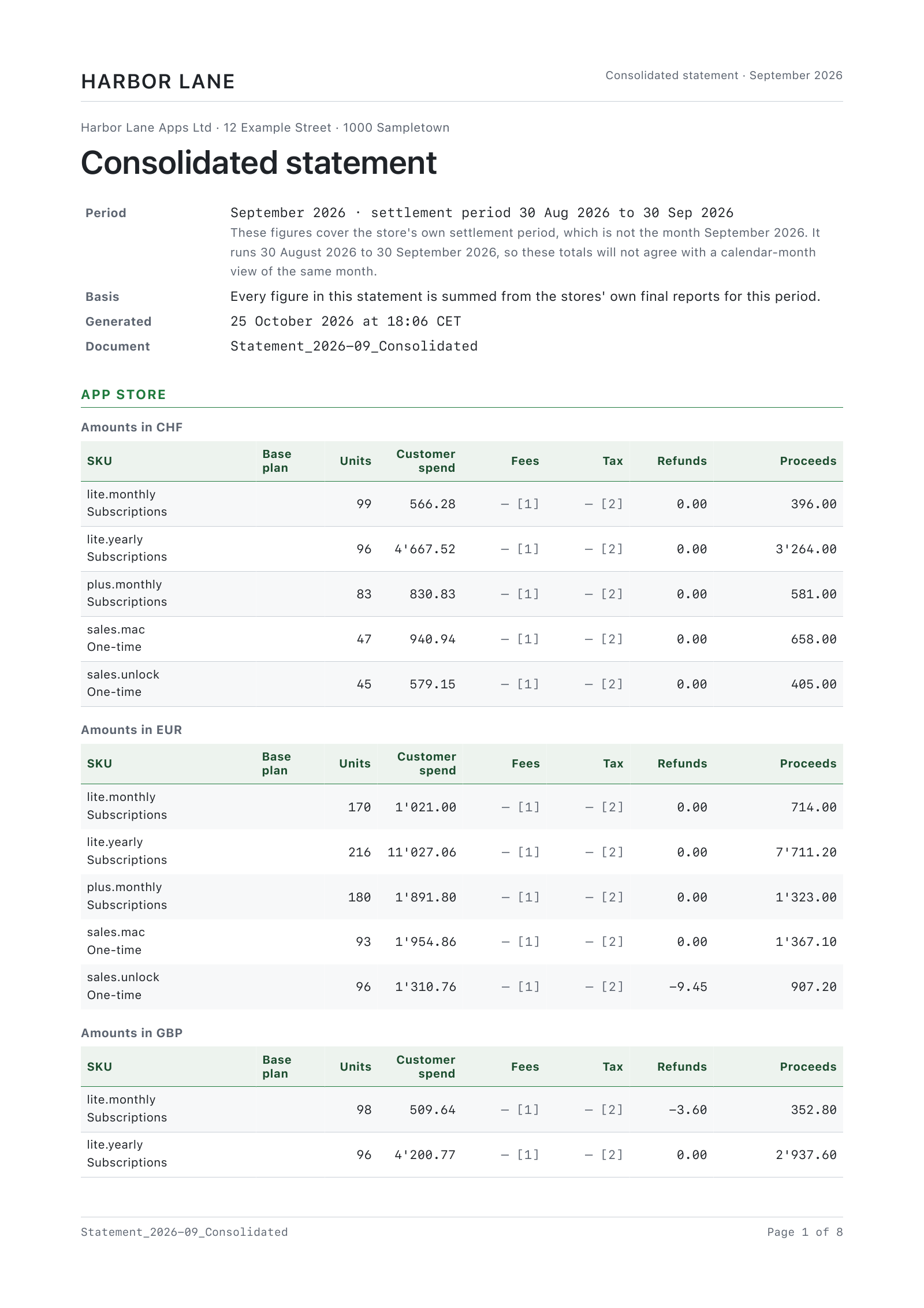
Close the month in one export. Choose the month and what it covers, and App Sales Dash writes a PDF your accountant can read and a CSV with the same figures for their spreadsheet or bookkeeping software. A consolidated statement gives each store its own section and subtotal, then the totals across all stores.
- Per store, per app or consolidated: a statement for each store, one across all three, or one for a single app.
- Every sale in its own currency: each product per storefront currency, totalled in yours.
- Refunds listed one by one: gross sales, refunds and net proceeds, each refund with its date, product and country.
- The payout beside your bank: what each store owes you and when, next to the credit you recorded.
- The store's own period, stated: the calendar month and the settlement period, so nobody guesses which days a total covers.
- Your letterhead, or none: your company, address and logo on every page, and nothing of ours.
HARBOR_LANE_Statement_2026-09_AppStore.csv
| Section | SKU | Units | Currency | Customer spend | Refunds | Proceeds | Product kind |
|---|---|---|---|---|---|---|---|
| Sales line | lite.monthly | 99 | CHF | 566.28 | 0.00 | 396.00 | subscription |
| Sales line | lite.monthly | 170 | EUR | 1021.00 | 0.00 | 714.00 | subscription |
| Sales line | lite.monthly | 98 | GBP | 509.64 | -3.60 | 352.80 | subscription |
| Sales line | lite.yearly | 96 | CHF | 4667.52 | 0.00 | 3264.00 | subscription |
| Sales line | sales.mac | 47 | CHF | 940.94 | 0.00 | 658.00 | oneTimePurchase |
| Sales line | sales.unlock | 96 | EUR | 1310.76 | -9.45 | 907.20 | oneTimePurchase |
Your data
Everything stays on your Mac
App Sales Dash stores its database and raw report archive on your Mac. There is no server, no account, and no analytics. Credentials go straight into the macOS Keychain and are sent to the three stores' own APIs and nowhere else.
Every store connection is read-only: the app can read your reports and can do nothing else to your store accounts. It writes nothing, anywhere, ever: the credentials it asks for cannot.
Who it's for
Solo developers
You sell one app on three stores, as a subscription, a paid download or a one-time unlock, and the only revenue picture you have is three dashboards that disagree. You want one figure per month, and to know when it is still going to change.
Small studios
A few apps, a few people, one person who does the books. Everyone runs the dashboard locally; the statements are what get handed over. Pick an app and every screen answers for it; the statement for one app goes to whoever needs it.
Whoever reconciles the payouts
You match store payouts against bank statements. You need expected amounts per period, a place to record what actually arrived, and a difference that is written down instead of ignored.
Anyone doing this by hand today
You have been rebuilding this from CSV downloads every month. The app fetches, archives, normalises and restates so you stop doing it by hand.
Anyone who has reported a month and then watched it change
You have watched a store restate last month without a word. Here, figures are labelled estimate or final, and every restated period is named in the notes.
How it's built
- Native macOS interface built with Swift and SwiftUI.
- Local SQLite ledger plus an immutable raw report archive; when a report reader improves, the archive is re-read locally and changed figures are announced. Nothing is re-downloaded.
- Estimate/final merge with five figure bases; restatements surfaced, never silent.
- Normalisation into your consolidation currency — by default the one your stores pay out in — at ECB daily reference rates. Rows with no rate are excluded and counted, never converted at a guess.
- Read-only connections to all three stores; the app writes nothing to any store account.
- Credentials in the macOS Keychain, sent only to the stores' own APIs.
- Statement exports read one consistent snapshot, so a sync mid-export can never mix figures.
- Updates through the Mac App Store; requires macOS 15 or later.
App Sales Dash for Mac
Consolidate, label, announce, reconcile and export, without your figures ever leaving your Mac.
App Sales Dash keeps its data and credentials on your Mac. No account is required.
Last updated