 App Sales Dash
What each store reports, and when
The stores do not report the same things, at the same speed, or with the same certainty. App Sales Dash applies one set of metric definitions to all three, and where a store cannot answer, the app says "cannot answer" instead of showing a zero. The same app on the App Store and Google Play is recognised as one app.
The three stores compared
| Aspect | App Store | Google Play | Stripe |
|---|---|---|---|
| What it provides | Daily sales, download and subscription reports (estimates), including what customers paid; monthly financial reports (finals) | Daily estimated sales, paid apps and one-time purchases included; monthly earnings (finals); daily subscription statistics | Invoices, charges, subscriptions and payouts from the live API; each price can be assigned to one of your apps |
| Credential | Team API key, Finance role: Issuer ID, Key ID, .p8 file, Vendor number |
Service-account JSON invited into Play Console, Cloud Storage URI, package name | One restricted key, seven Read permissions |
| Read-only | Yes: reports only | Yes: report files only | Yes: nothing writable on the key |
| Daily data appears | The day after, as estimates | Estimates daily; subscription statistics lag 3–7 days | Same day, final |
| Finals arrive | About a week after Apple’s settlement period closes | Around the 3rd of the following month | Immediate: figures are final on arrival |
| Typical payout | About 33 days after the end of Apple's fiscal month | Around the 15th of the following month | On each payout's own arrival date |
| Setup time | About 5 minutes | About 20 minutes | About 5 minutes |
When data appears
App Store
Daily reports for a given day appear the day after, as estimates. The authoritative financial report follows about a week after Apple’s fiscal month closes. Those spans start and end mid-month rather than on the 1st, so the app states the settlement span in real dates beside the calendar month (“Jul 2026 · 28 Jun to 1 Aug 2026”). Apple keeps daily reports for one year only; the first download fetches what exists and the archive preserves it from then on. What customers paid arrives with the daily estimate and is restated by the monthly report.
Google Play
Reports begin once the Play account has financial activity. A brand-new account has nothing to fetch yet, and the app will say so rather than show empty charts without explanation. Estimated sales update daily; earnings finals land around the third of the following month; subscription statistics lag 3 to 7 days, and the app marks the trailing week provisional.
Stripe
Data is final on arrival, so there is no estimate-to-final handover. Payouts appear with their own arrival dates and the trace id the bank statement will carry.
Downloads and one-time sales. Free and paid first installs come from the App Store's daily reports; Google Play reports paid installs only. Paid apps and one-time purchases come from every store that sells them. Stripe has no install count.
What each store cannot say
Some questions a store simply cannot answer. You see that on the chart, instead of a zero you might quote by mistake:
- Apple does not split its commission and tax out of the customer price, so fees and tax stay blank for the App Store, and the app says so.
- Apple's financial reports carry no new-versus-renewal flag, so a finalised Apple month's new/renewal split stays on the estimate basis and is labelled as such.
- Apple counts a cancellation when the paid period ends: a cancelled yearly subscription appears on its expiry date.
- Google Play does not report trial counts, cancellation reasons, or the difference between upgrades and downgrades; those figures come back "cannot answer" for Play rather than zero.
- Stripe requires the Credit notes permission so that credits which never move money are counted. Without it the app stops the Stripe source rather than silently overstating revenue.
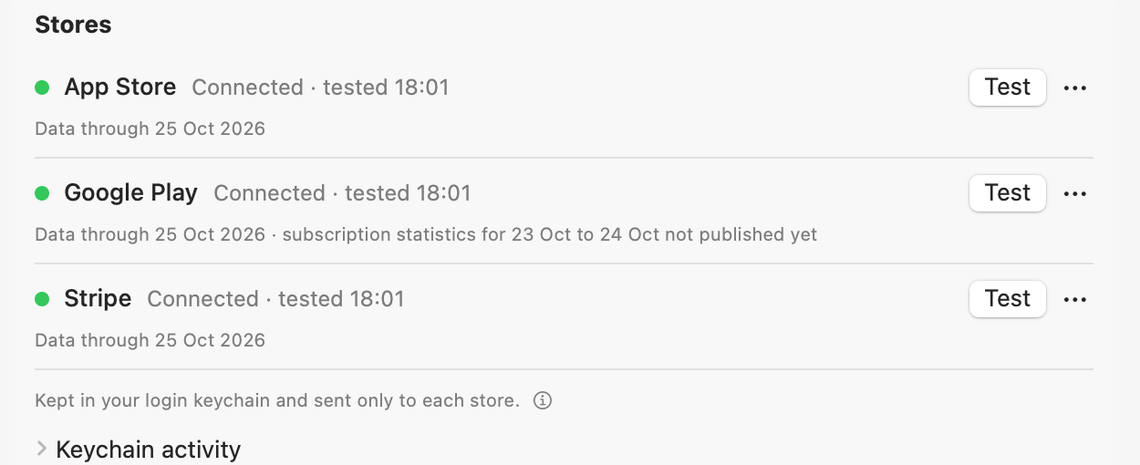
Set up in any order
Each store's credential is created in that store's own console and entered under Settings > Stores. The built-in Setup guide… walks each one through, including the traps, like Apple's Individual-keys tab that authenticates perfectly and is refused every report, or a Play permission granted per-app when it must be account-wide. Test verifies each store with one read and keeps its verdicts apart: a working connection, a real key missing a permission, a refused key, or no answer at all. Folding those together is how someone re-issues a key that was never the problem.
Order does not matter. A store with no credentials contributes no figures until it is added, and every screen says so out loud.
Last updated